PixelHue U5 Event Control Console: A Technical Look at Centralized Control for Modern Live Video Workflows
For video engineers, technical directors, screen management operators, and AV production teams, show control is no longer just about switching between inputs. Modern live events often involve multiple screens, LED processors, presentation switchers, media servers, camera feeds, playback machines, IMAG, branded content, auxiliary outputs, speaker timers, confidence monitors, remote presenters, and sometimes projection or broadcast feeds too.
That is exactly the kind of environment the PixelHue U5 Event Control Console is designed for.
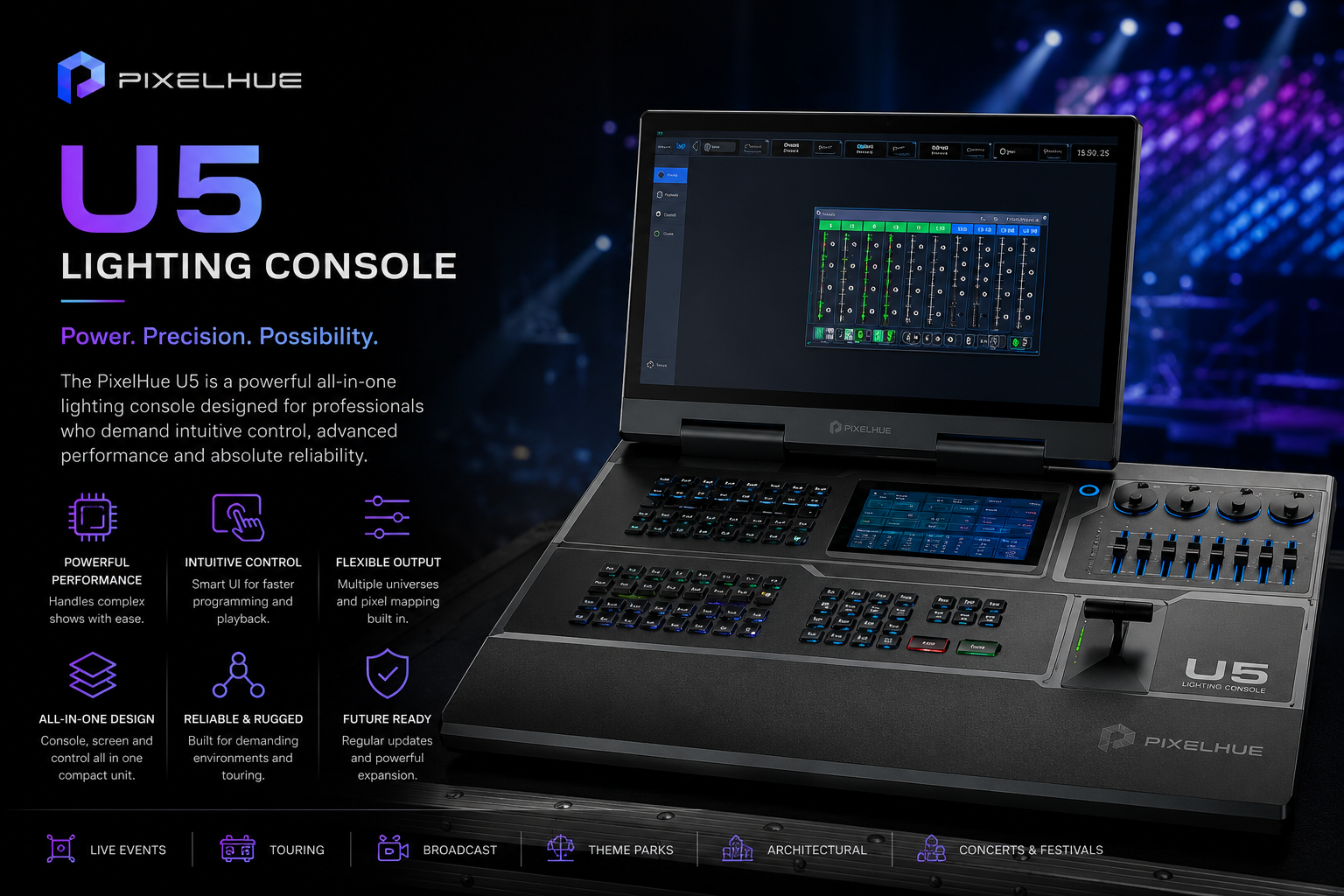
The U5 is a compact event controller built for professional live production workflows. It is designed to centralize hands-on control of PixelHue video processing systems, including P Series multi-layer presentation switchers, Q Series multi-screen management systems, and X400 media servers. In other words, it gives operators a dedicated hardware surface for managing complex video systems instead of forcing everything through a mouse, keyboard, and software interface.
Officially, the PixelHue U5 includes a compact ruggedized housing, 87 user-programmable LCD buttons, four encoders, eight faders, a high-resolution T-bar, a 21.5-inch main touchscreen, and an 8-inch smart touchscreen. It also features a foldable design built for road use, helping the console survive the realities of touring and event production. (pixelhue.com)
For AV techs, the value is not just that it has a lot of buttons. The value is that it gives the video operator a more tactile, repeatable, and show-safe way to run complex visual systems.
Why Dedicated Event Control Still Matters
Software-based control is powerful, but live events are not always the best place to rely only on a trackpad and a laptop screen. When a show is moving quickly, operators need physical controls that are easy to locate, easy to label, and easy to trigger without second-guessing.
That is where the U5 makes sense.
A dedicated control console gives the operator a physical surface for show cues, source recalls, layer control, screen presets, effects, transitions, output routing, and system navigation. The more complex the show becomes, the more valuable that physical interface becomes.
In a high-pressure show environment, the operator may need to fire a video playback cue, transition a keynote source, adjust a layer, route a camera feed to an auxiliary output, recall a preset look, and monitor multiple system states within seconds. A console like the U5 helps reduce the friction between the operator and the system.
For more professional video rental options, you can browse Eagle Production Co.’s video rental inventory here: https://eagleproductionco.com/rentals/video
PixelFlow at the Center of the Workflow
The U5 is built around PixelHue’s PixelFlow software ecosystem. PixelFlow is the control environment used to manage compatible PixelHue systems, allowing operators to configure, control, and monitor event video workflows from a centralized interface.
This matters because the U5 is not just a generic MIDI-style surface. It is designed to work with PixelHue’s own hardware ecosystem. That gives the operator deeper integration with supported presentation switchers, multi-screen processors, and media servers.
For AV teams using PixelHue P Series, Q Series, or X400 systems, this creates a unified workflow. Instead of managing each piece of equipment through separate control surfaces or disconnected software tools, the U5 becomes the central point of interaction.
From a production perspective, that can simplify show operation. The system can be built around scenes, presets, layers, outputs, cues, and control assignments that make sense for the event rather than forcing the operator to jump between multiple interfaces.
87 Programmable LCD Buttons
One of the headline features of the U5 is its 87 user-programmable LCD buttons. (pixelhue.com)
For live event control, programmable LCD buttons are extremely useful because they can provide both tactile control and visual feedback. Instead of unlabeled generic buttons, each control can be assigned to specific functions, sources, screens, presets, cues, macros, or workflow steps.
This is especially valuable when the show file is complex. A corporate general session might include keynote decks, sponsor videos, remote presenters, camera feeds, lower thirds, walk-in loops, sponsor loops, branded holding slides, and emergency backup sources. A concert or immersive show might include playback looks, LED wall presets, camera routing, content layers, and timecode-based cues.
The ability to label and organize buttons for the show helps reduce operator error. It also makes handoff easier if multiple operators or techs need to understand the control layout.
Touchscreen-Based Visual Control
The U5 includes a 21.5-inch main touchscreen and an 8-inch smart touchscreen.
This combination gives the operator both a large visual workspace and a smaller dedicated control display. The main touchscreen is useful for managing the broader show interface, while the smart touchscreen can provide quicker access to specific control areas, system feedback, or contextual functions.
For video engineers, visual feedback is critical. You need to know which sources are live, which presets are armed, which layers are active, and how the system is responding. A touchscreen-based workflow helps make the control environment more visible and less abstract.
This is especially useful when working with multi-screen systems. If a show has main LED, side screens, confidence monitors, DSMs, breakout feeds, overflow rooms, and streaming outputs, the operator needs a clear way to understand what is being sent where.
You can explore Eagle Production Co.’s full rental catalog here: https://eagleproductionco.com/rentals
T-Bar, Encoders, and Faders for Real-Time Control
The U5 includes a high-resolution T-bar, four encoders, and eight faders.
That hardware matters because not every video control task should be handled by clicking buttons on a screen. Some operations benefit from continuous physical control.
The T-bar is useful for manual transitions, giving the operator hands-on control over timing and feel. Faders can be useful for layer opacity, audio-related control, source levels, or assigned parameters depending on the workflow. Encoders are useful for fine adjustments, navigation, parameter changes, and real-time control where precision matters.
For live events, this tactile layer gives the operator better control during moments that cannot feel robotic. A keynote transition, walk-on sting, speaker reveal, product launch moment, or live camera transition may need to be timed manually to match the room. Physical controls make that easier.
KVM, PTZ, and Timecode Capabilities
The U5 is also designed for broader production control beyond basic switching. Published reseller specifications list KVM functionality, PTZ control, LTC timecode input/output, and simultaneous control of multiple switchers and media servers.
Those features are important because modern video control often touches many parts of the production.
KVM functionality can reduce desk clutter and allow operators to manage connected systems more efficiently. PTZ control is useful when robotic cameras are part of the production, especially in corporate, house of worship, broadcast, or streaming environments. Timecode capability matters when video, lighting, audio, and automation need to stay synchronized across cue-based or playback-heavy shows.
For productions with structured cue stacks, timecode can help align visual changes with music, playback, speaker cues, or show control events. Even when the show is not fully timecoded, having LTC support gives the system more integration options.
Designed for Road Use
The U5 is built with a compact, lightweight ruggedized housing and a foldable display design.
That matters for rental and touring environments because control surfaces need to survive repeated transport, setup, strike, and repacking. A beautiful control console is not useful if it is too fragile for real production use.
The foldable design makes the U5 easier to transport and protect. It also helps reduce the amount of space required compared with larger fixed-screen control desks. For flypacks, control positions, FOH video worlds, and compact production booths, that footprint matters.
The U5 is also listed with a 24 kg weight, 240 W power consumption, and physical dimensions of 740 × 651.4 × 431.6 mm, making it substantial enough for professional use while still manageable as a compact event console.
Where the PixelHue U5 Makes Sense
The PixelHue U5 is especially useful in productions where the video system needs centralized control but the footprint of a larger console is not required.
It works well for corporate events, product launches, conferences, award shows, houses of worship, touring productions, concerts, LED wall shows, hybrid events, livestream productions, exhibition booths, immersive rooms, and brand activations.
It is particularly valuable when paired with PixelHue’s video processing ecosystem. If the show uses P Series presentation switchers, Q Series multi-screen management systems, or X400 media servers, the U5 gives operators a purpose-built control surface rather than a generic control method.
For more PixelHue and video control rental options, visit: https://eagleproductionco.com/rentals/video-control
Why the U5 Works Well as a Rental Console
The U5 is a strong rental product because it gives production teams a compact but serious control interface for complex video systems.
It offers programmable LCD buttons, touchscreen operation, physical faders, encoders, a T-bar, PixelFlow integration, KVM functionality, PTZ control, timecode support, and simultaneous control of multiple systems. That makes it useful across different show types without being limited to one narrow workflow.
For rental companies, it gives clients a professional control surface that can scale with the show. For video operators, it gives a more tactile and reliable way to run cue-heavy productions. For production managers, it helps make the control world look and operate like a serious show system.
Final Thoughts
The PixelHue U5 Event Control Console is built for the modern reality of live video production. Shows are more screen-heavy, more cue-driven, and more integrated than ever before. Operators need control surfaces that can keep up.
With 87 programmable LCD buttons, four encoders, eight faders, a high-resolution T-bar, a 21.5-inch main touchscreen, an 8-inch smart touchscreen, PixelFlow integration, KVM, PTZ, timecode capability, and compact road-ready construction, the U5 gives video teams a powerful centralized control platform.
For AV techs, the value is not just in the hardware. It is in the workflow. The U5 helps turn complex video systems into something an operator can manage quickly, confidently, and repeatably during a live show.
If you are looking to rent the PixelHue U5 Event Control Console for an upcoming production, you can find the product here: https://eagleproductionco.com/product/pixelhue-u5-event-control-console